Codename One vs Flutter
Flutter’s UI freedom. Less memory. Faster native apps.
Both frameworks give you lightweight, custom-rendered components and one application across iOS, Android, Windows, macOS, Linux, and web. Codename One goes further: builder-managed native integration, direct synchronous calls, and a smaller runtime footprint. In our October 18 Flutter Gallery benchmark, it wins all 26 measured size, startup, and idle-memory comparisons.
Same Flutter source. Measured in CI.
Faster startup. Lower RAM. Smaller builds.
We build Flutter’s own Gallery from the same Dart source with Flutter and Codename One. Both are release builds, measured on the same runner in nine interleaved rounds. Codename One carries the Flutter compatibility layer in this comparison: these are results for reused Flutter code.
Android is a major reason to choose Codename One
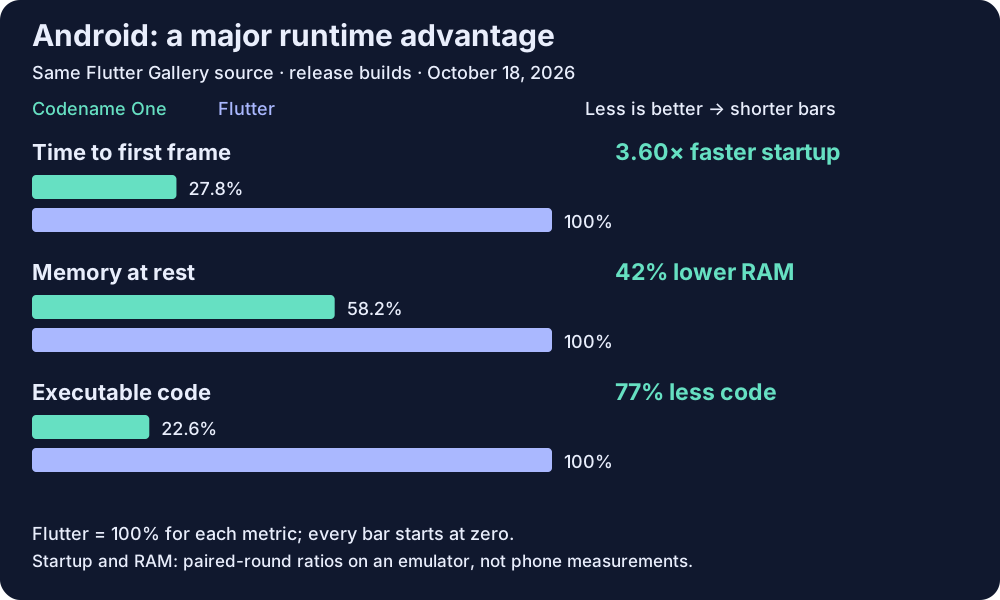
3.60× faster startup. 42% lower RAM. 77% less executable code.
On Android, Codename One runs application bytecode on ART, the runtime already supplied by the OS. Flutter ships its engine and Dart runtime support alongside its AOT-compiled application. That architectural difference matters: the Gallery run shows a large startup and code-footprint advantage even while Codename One carries the Flutter compatibility layer.
For an Android-first product, this puts launch time and memory budget at the center of the framework decision. The measurements below come from an emulator; verify the gains on your target phones and your own screens.
| Target | Startup speedup | Idle RAM reduction | Executable code reduction | Compute speedup |
|---|---|---|---|---|
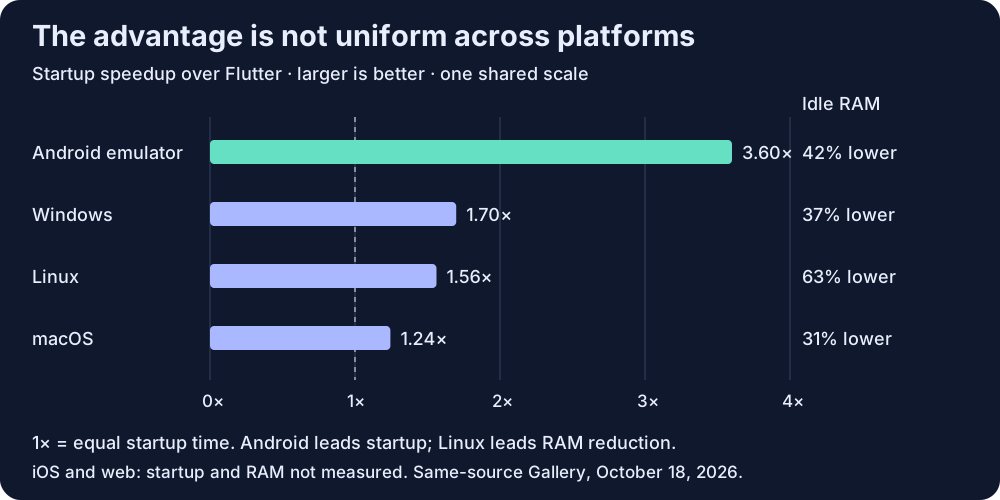
| Android emulator | 3.60× | 42% | 77% | 1.39× |
| Linux | 1.56× | 63% | 14% | 1.94× |
| Windows | 1.70× | 37% | 22% | 2.03× |
| macOS | 1.24× | 31% | 33% | 1.83× |
| iOS device bundle | Not measured | Not measured | 13% | Not measured |
| Web | Not measured | Not measured | 50% | 0.29× (Flutter leads) |
Startup measures the first content frame. Startup and RAM comparisons use the median of paired round ratios; reductions are rounded from those ratios. Code reductions use bundle code bytes. Compute is a separate geometric mean of comparable workloads: 11 on Android, Linux, and macOS, 10 on Windows, and 6 on web. Individual workloads can favor Flutter; mismatched or unmeasured results do not enter the mean. These measurements do not establish scrolling or animation performance.
iOS sizes use release device bundles; startup, RAM, and compute need a separate device measurement. Android timings are emulator results, not phone timings. Web startup and RAM are unmeasured, and Flutter leads its measured compute subset. The 26 wins cover application size, startup, and idle RAM, not every compute workload.
Read this complete result snapshot, inspect the harness and methodology, or check the latest published results.
Performance is a maintained engineering requirement. The benchmark workflow runs nightly and on relevant pull requests. It checks native head-to-head results and Codename One regression baselines. Web head-to-head losses remain visible and report-only; correctness and baseline checks still apply. This makes performance something we keep testing as the framework evolves.
Why the architecture matters
Keep the lightweight UI. Remove more platform work.
The same freedom to own your pixels
Flutter widgets and Codename One components both render their own UI instead of wrapping an OS control for every button. Both support shared layouts, animation, input, networking, storage, and native integration. Codename One adds CSS theming and a universal Java simulator. The difference is how much runtime and build machinery you need around that shared UI.
Builders absorb native project churn
Codename One generates the platform projects from your application, dependencies, and build hints. Supported native integrations live in the builders, so fixes to generated manifests, targets, and SDK wiring can be made centrally. Cloud builds also remove local Xcode and Android SDK setup from the normal application workflow. You still control signing, permissions, and platform-specific behavior.
Widgets and VPNs without hand-built project plumbing
The surfaces API generates supported widget and Live Activity integration. The VPN API and builders handle supported native service and extension wiring. Unused surfaces add no WidgetKit extension or Android receiver. This is build-time generation, not an extra runtime service mediating every call; the native feature itself still has its normal resource costs and OS restrictions.
Synchronous native APIs stay synchronous
Codename One native interfaces can call a synchronous OS API and return its result directly, subject to the platform’s threading rules. That fits ordinary Java, Objective-C, and C APIs without turning every interaction into a request and callback. Flutter’s platform channels use asynchronous messages. Flutter also has FFI and direct native interop; it would be wrong to describe all Flutter calls as asynchronous. Network operations and asynchronous OS APIs still need asynchronous handling in either framework.
Less runtime to carry
Android application code uses the OS’s ART runtime. Native iOS and desktop builds compile Java bytecode through ParparVM to C and native machine code. Imported Flutter screens take that same path without shipping the Flutter engine. The Gallery measurements show the resulting footprint advantage, including the cost of our compatibility layer.
Broad reach, shared application features
Both cover the six main mobile, desktop, and web targets. Codename One also has watch, TV, and vehicle integrations; port status shows target-specific coverage. Common application capabilities overlap broadly, but OS features and third-party plugins require a target-by-target check. Flutter’s larger plugin ecosystem and established Dart tooling remain reasons to choose it.
Reuse Flutter screens
You can keep Flutter widgets and change the runtime.
Import a Flutter project or embed a supported widget tree inside an existing Codename One form. Dart is translated to Java at build time. FlutterUI.wrap(widget) returns an ordinary Codename One Container, sharing layout, event dispatch, and accessibility with your Java components. No embedded Flutter engine or separate platform view is required.
Whole-app import runs the translated Dart entry point; incremental migration lets you mix Java and Dart screens. Java and translated Dart share one runtime, so direct calls between them are ordinary method calls. Supported MethodChannel and EventChannel APIs also help port existing integration code.
Flutter compatibility is experimental. Most widgets render, but some callbacks and parameters are ignored, and validation has centered on the Gallery. Unsupported language constructs and package APIs need work; Flutter plugins are not automatically portable. Test the interactions your app uses. Read the import and embedding guide.
Architecture at a glance
Compare what your application actually ships.
The language, runtime, UI layer, test cycle, and vendor incentives affect the product long after the first screen works.
| Decision | Codename One | Platform UI | Flutter | Web |
|---|---|---|---|---|
| Primary ecosystem | Java, Maven, JVM libraries, and mainstream Java IDEs | Swift/Xcode plus Kotlin or Java/Android Studio | Dart, pub packages, and Flutter tooling | HTML, CSS, JavaScript, and browser tooling |
| Android execution | Java bytecode runs on Android's ART runtime and calls Android APIs directly | Kotlin or Java runs on ART with direct Android APIs | AOT-compiled Dart code runs with the Flutter engine | JavaScript inside a browser or WebView |
| iOS execution | ParparVM translates Java bytecode to C, then Xcode compiles the native binary | Swift or Objective-C compiled by Xcode | AOT-compiled Dart code runs with the Flutter engine | JavaScript in WebKit, or a native wrapper around it |
| Shared UI | One UI implementation across mobile, desktop, web, watch, TV, and vehicle targets | Separate Swift and Kotlin UI implementations | Shared across Flutter-supported targets | Shared across browsers; native wrappers add platform work |
| Theming | CSS themes shared across targets, with platform-specific selectors when needed | Separate SwiftUI/UIKit and Compose/View styling | Theme and widget code written in Dart | CSS interpreted by the browser |
| Local development | One JavaSE simulator with device skins, component inspection, networking tools, tests, and MCP control | Platform simulator and emulator toolchains | Flutter tooling plus platform simulators for native behavior | Browser developer tools |
| CI testing | Shared logic, UI, and screenshot tests can run on the JVM or headless JavaScript before native builds | Separate iOS and Android test jobs | Dart tests plus native jobs for platform behavior | Headless browser tests; wrappers need native jobs |
| Runtime packaging | Android application bytecode runs on ART. On iOS, ParparVM translates Java bytecode to C before Xcode compiles the native binary. The Codename One UI toolkit is bundled with the app | Uses each OS runtime and UI toolkit | Release builds bundle AOT-compiled Dart code with the Flutter engine and its Dart runtime support | Runs inside a browser engine or WebView |
| Native OS components | Native interfaces plus PeerComponent for real maps, browsers, cameras, and other platform views | Direct access to every platform component | Platform channels and Platform Views | Browser APIs or wrapper plugins |
| License and direction | Independent, open source, GPLv2 with Classpath Exception, no royalties | Controlled separately by Apple and Google | Open source and directed by Google | Standards and engines controlled by browser vendors |
The Codename One advantage
One strict Java codebase, one simulator, one set of tests.
- Keep Java's library ecosystem, Maven builds, and mainstream profiling and debugging tools.
- Theme the shared UI with CSS instead of rebuilding styling in each platform language.
- Run most UI and logic work in the universal JavaSE simulator without waiting for a native build.
- Move fast CI work onto ordinary JVM or headless browser runners, then reserve native builders for native verification.
- Reuse Android's built-in ART runtime. The Codename One UI toolkit ships with the application; it does not add a browser or a second language runtime on Android.
- Embed real OS views when you need them, and call native SDKs synchronously when the platform permits it.
- Ship any number of commercial applications without royalties or per-app fees.
- Work with an independent framework company whose revenue depends on customers shipping across vendors.
Platform UI
Two vendor toolkits and two UI implementations.
- You get immediate access to each vendor's newest APIs.
- You also maintain separate Swift and Kotlin screens, tests, behavior, and release work.
- Apple or Google can restyle platform-owned controls after your application ships.
Flutter
A Dart codebase built around the Flutter engine.
- Release builds include AOT-compiled Dart code, the Flutter engine, and Flutter runtime support. On Android, Codename One application bytecode runs on ART.
- Flutter has an extensive plugin ecosystem and established Dart tooling. Codename One supports incremental reuse of Flutter screens through its experimental Dart-to-Java compatibility layer.
- Native integration uses asynchronous platform channels, direct interop, or Platform Views. Codename One uses native interfaces and
PeerComponent, including synchronous native calls where the platform permits them.
Web
A URL-first application inside the browser.
- The web is a strong deployment target when a URL and browser APIs match the product.
- App-store packaging adds a WebView wrapper and native integration layer.
- Codename One includes a JavaScript port when the same Java application also needs web reach.
Control the whole development loop
Codename One removes duplicated work before the store build.
Java is native on Android
Your application code runs as Java bytecode on Android's own ART runtime. Codename One adds a portable UI and API layer; it does not hide Android behind JavaScript.
Java tooling stays useful
Use Maven, IntelliJ IDEA, NetBeans, Eclipse, VS Code, JUnit, profilers, and the wider JVM library ecosystem. The mobile project remains a Java project.
CSS controls the UI
One CSS theme covers the shared component hierarchy. Platform selectors and constants let you diverge deliberately without creating another screen implementation.
Test before native CI
The JavaSE simulator runs the same shared UI and business logic locally. JVM and headless JavaScript jobs catch routine failures before scarce macOS or device infrastructure is involved.
Native integration is explicit
Native interfaces expose platform SDKs. PeerComponent embeds heavyweight OS views such as maps and browsers inside the shared UI.
No royalties or vendor agenda
The framework is open source and independent. Commercial applications have no royalty or per-app fee, and the business succeeds when customers keep shipping across Apple, Google, desktop, and web targets.
Verify it in your codebase
Build the screen that makes other frameworks expensive.
Use a screen with real layout, CSS, business logic, and one native view. Run it in the simulator, add a JVM test, then submit iOS and Android builds from the same project.
- 1Generate the Java project.
- 2Build and theme one representative screen.
- 3Add the native view your product needs.
- 4Run local tests, then build for both stores.
Keep the codebase
Create a Java project and test the architecture yourself.
The framework is open source and royalty free. The free cloud tier includes 100 free cloud build credits each month.